A support or learning and development lead is often handed two templates after being told to “document the process.” One asks for roles and controls; the other asks for screenshots and exact clicks. The right choice depends on the problem the document must solve: use an SOP to coordinate a process across people or teams, and a work instruction to guide one person through a specific task. Most operating systems need both, linked so a change in one can trigger a review of the other.
| Attribute | Standard operating procedure | Work instruction |
|---|---|---|
| Primary question | What process must happen, who owns it, and when? | Exactly how does someone perform this task? |
| Scope | A process across one or more roles | A discrete activity, often for one role |
| Main purpose | Coordination, governance, and consistency | Reliable execution at the point of work |
| Typical content | Purpose, scope, roles, inputs, outputs, controls, escalation | Steps, tools, values, settings, decision branches, checks |
| Best reader | Process owners and participating teams | The person completing the task |
| Relationship | Sets process expectations | Implements a linked part of the process |
What Each Document Actually Is
A standard operating procedure, or SOP, is a process-level control document. It defines the purpose and scope of a workflow, the roles involved, the sequence of work, the inputs and outputs, the controls, and when to escalate an issue. An SOP might explain how a software release moves from approval to customer support, without detailing every click in the support platform.
A work instruction is a task-level execution guide. It tells an operator how to complete a discrete activity, including the right tool, values to enter, settings to use, safety checks, decision points, and acceptance criteria. If the SOP says a support agent must record a refund decision, the work instruction shows exactly where to find the order, which field to update, and how to verify the change.
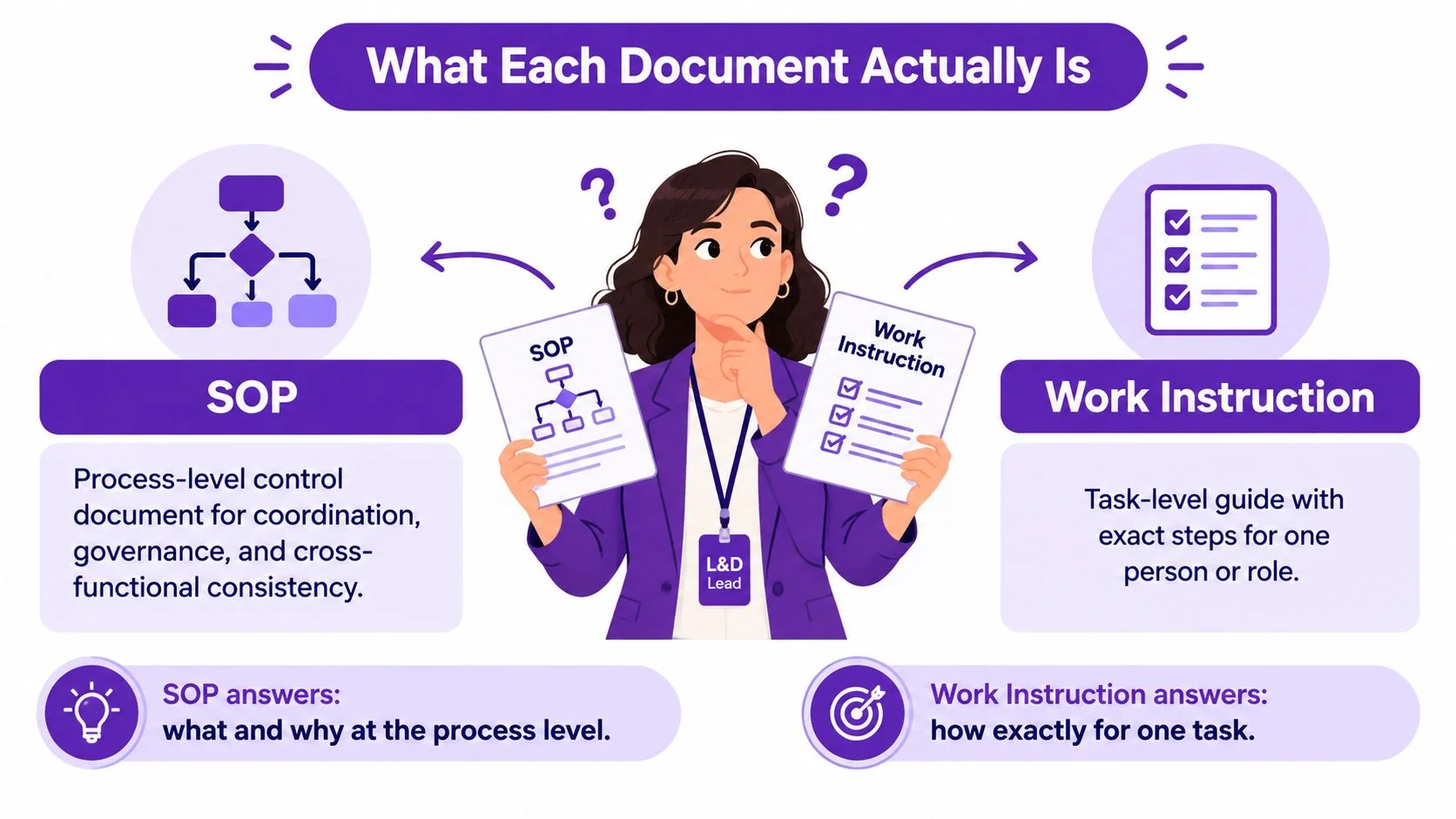
The distinction is operational, not bureaucratic. SOPs coordinate work between people and departments; work instructions reduce variation at the point of execution. A process-level document answers what, who, and when. A task-level guide answers how, exactly.
| Attribute | Standard operating procedure | Work instruction |
|---|---|---|
| Scope | End-to-end process or coordinated workflow | One task or action |
| Detail | Sequence, responsibilities, and controls | Exact steps and expected results |
| Example | How a maintenance request moves from reporting to closure | How a technician inspects a particular component |
| Failure it helps prevent | Handoffs, unclear ownership, inconsistent governance | Mistakes, missed checks, and uneven task execution |
ISO 9001:2015 requires organizations to maintain documented information needed to support process operation and retain evidence that processes were carried out as planned. It doesn’t require every organization to create documents named “SOP” or “work instruction.” Its guidance identifies both procedures and work or test instructions as possible forms of documented information, with the right level of documentation determined by the organization’s needs (ISO guidance on documented information).
Choosing the wrong form often creates work later: duplicated explanations, screenshots embedded in broad documents that quickly go stale, or audit findings when nobody can show who owns a process or how its execution is controlled. For teams documenting maintenance, the same distinction supports dependable work and optimizing plant maintenance reliability.
Side-by-Side Comparison Across Six Criteria
A useful standard operating procedures vs work instructions comparison goes beyond document length. The practical differences show up in the reader, ownership, and what triggers a revision.
| Criterion | Standard operating procedure | Work instruction |
|---|---|---|
| Purpose | Control and coordinate a process | Guide exact task execution |
| Primary audience | Process owners and participating roles | The person performing the task |
| Level of detail | Responsibilities, sequence, controls, exceptions | Field values, tools, settings, checks |
| Format and length | Structured narrative or process flow | Numbered steps, screenshots, checklist |
| Ownership and approval | Process owner, with relevant stakeholders | Task or system owner, with domain review |
| Maintenance cadence | Review when process governance changes | Update when task details or tools change |
Purpose. An SOP makes the process consistent across functions. A work instruction makes a particular action repeatable. If teams disagree about who takes a request next, fix the SOP. If an employee can’t tell which field to fill in, fix the instruction.
Audience. SOPs need to work for people handing work off as well as those doing it. Instructions should be written for the person at the keyboard, workstation, or machine. Don’t make a frontline operator infer the process from a document designed for managers.
Level of detail. An SOP describes the sequence and control points, not every interaction with a tool. An instruction should specify the exact action and how to know it succeeded. Include only the detail needed to perform the task correctly.
Format and length. A process map and a concise SOP can establish flow and ownership; a checklist or visual guide can make a task easier to follow at the point of use. Format should serve the work, not a template requirement.
Ownership and approval. A process owner should approve the SOP because that person is accountable for the workflow. The task or system owner should verify the instruction, especially where software screens, equipment, or acceptance criteria can change.
Maintenance cadence. A process can remain stable while its implementation changes. Review the SOP when roles, controls, or policy shift. Refresh an instruction when a tool, screen, task sequence, or acceptance check changes.
Rule of thumb: If the problem crosses roles, write or revise the SOP; if the problem happens while someone performs a task, write or revise the work instruction.
Templates and a Real Conversion Example
Use templates to establish a minimum structure, not to force every process into identical prose. The SOP should make ownership and controls clear. The work instruction should be usable beside the tool or task it describes.
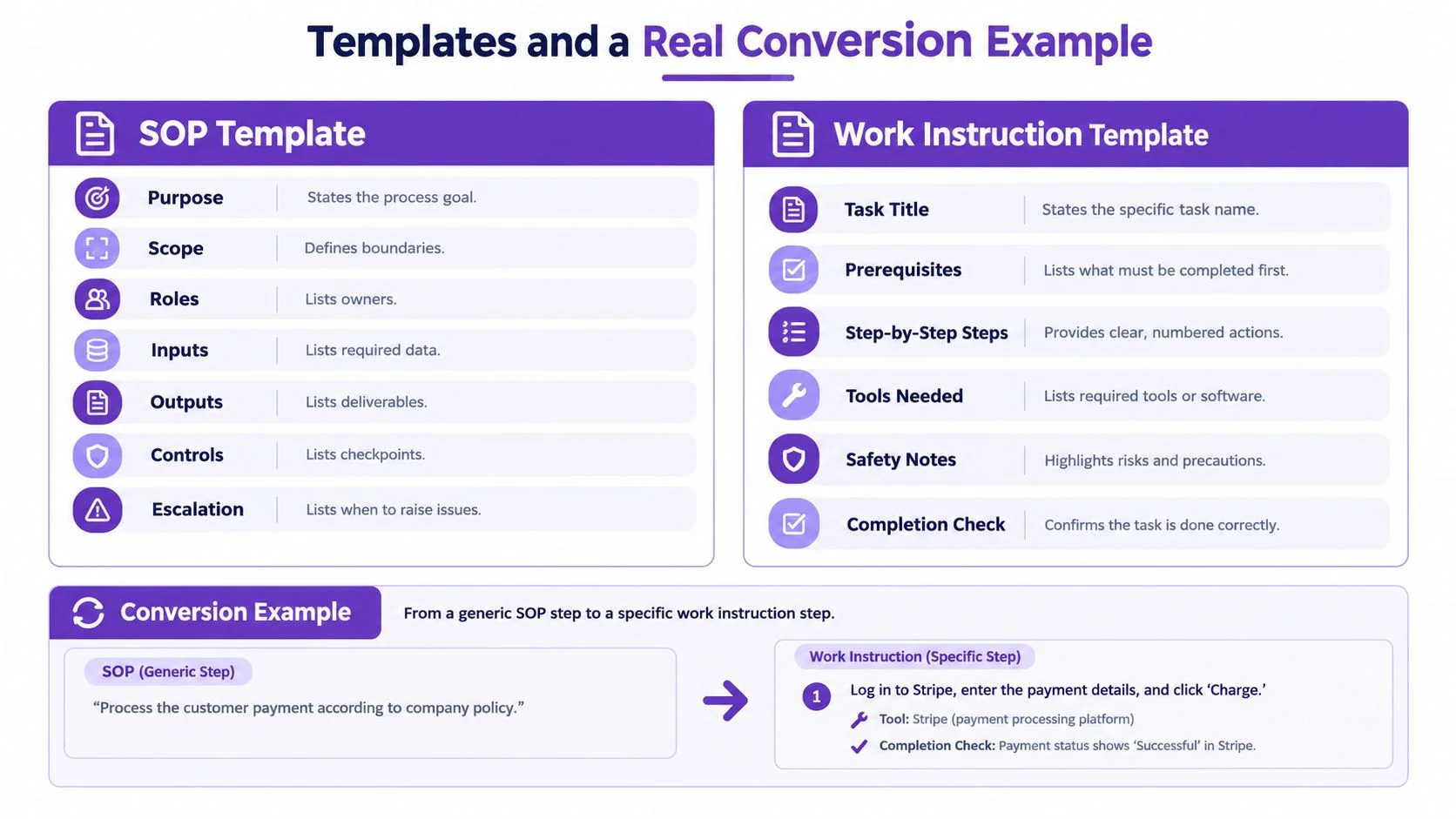
Copy-ready SOP skeleton
- Purpose: State the process goal.
- Scope: Define where the process starts and ends, and what it excludes.
- Roles: Name the owner and participating roles.
- Inputs: Identify the information or conditions needed to begin.
- Outputs: State what the process produces.
- Controls: List approvals, checks, or records that prevent errors.
- Escalation: Explain who handles exceptions and when to involve them.
Copy-ready work instruction skeleton
- Task title: Name one activity and its intended user.
- Trigger and prerequisites: State when the task applies and what must be ready.
- Tools needed: List the software, equipment, or reference material.
- Steps and expected results: Number the actions and say what should appear after each one.
- Decision branches: Explain what to do when the task reaches a defined exception.
- Safety notes: Identify relevant hazards and required precautions.
- Acceptance criteria: Define how the operator confirms completion.
For a customer refund workflow, the SOP sets the rules for intake, eligibility review, decision ownership, customer communication, and recordkeeping. It also names who resolves an exception, such as a request that falls outside the normal refund policy.
The linked work instruction covers the agent’s task in the support tool: open the customer record, locate the relevant order, enter the decision in the designated field, select the applicable reason, and confirm that the record reflects the outcome. It includes an exception path for a missing order or unclear eligibility. Those precise field names and actions are examples to adapt to the organization’s actual system, not universal settings.
Keep the documents linked by ID and title. If the SOP changes the approval threshold or exception owner, review the instruction’s decision branch. If the support tool changes a field or workflow, update the instruction and check whether the SOP’s control still works.
Use this instruction guide template as a starting point for a task-level guide. Before approving either template, check that it names an owner, states the expected result, explains how to handle exceptions, and points to any linked record or document.
Building a Document Architecture That Links Them
A useful document system has a clear path from policy to proof. Each tier answers a different question, and readers shouldn’t have to treat a work instruction as a substitute for the process that governs it.
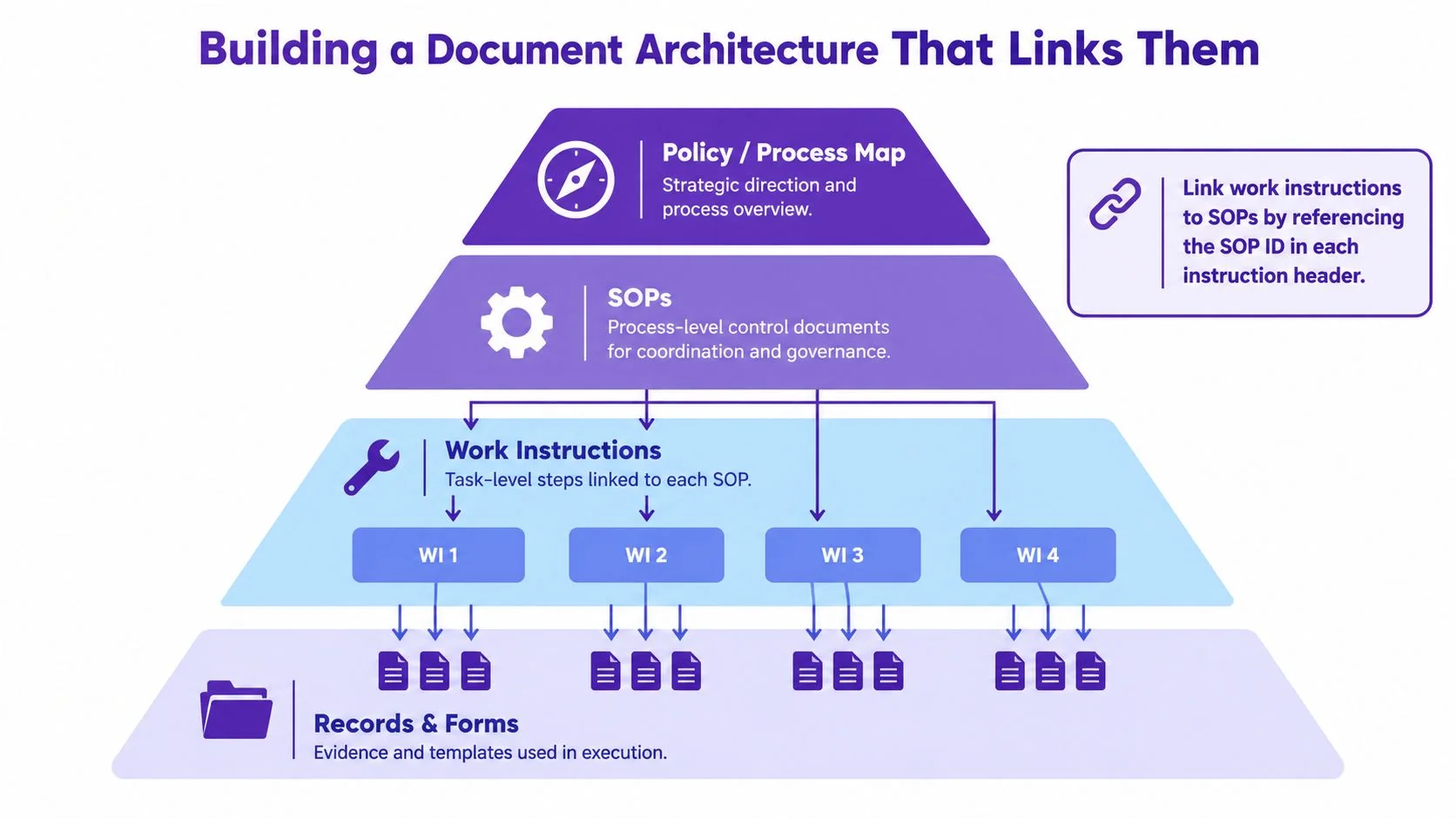
| Tier | Document type | Question it answers | Suggested owner |
|---|---|---|---|
| Top | Policy or process map | What principles or process boundaries apply? | Policy owner or process leadership |
| Process | SOP | Who does what, in what order, and under which controls? | Process owner |
| Task | Work instruction | How does the person complete this activity? | System, feature, or task owner |
| Evidence | Records and forms | What proves the work was completed? | Record owner or operating team |
The hierarchy should be navigable in both directions. An SOP should link to its relevant work instructions, and each instruction should identify its governing SOP. The instruction should also point to the record or form used to capture completion. In a SaaS documentation team, a documentation lead can maintain the taxonomy and links without taking ownership away from the process and system experts.
Set review expectations according to what can change. A scheduled review helps owners catch drift, but it doesn’t replace event-driven review. A change to a hazard, control, sequence, role, or acceptance criterion should trigger an impact assessment across linked documents. Retraining may also be needed when the change affects how employees perform the task.
Keep the source of truth explicit. A video can demonstrate an action, but it shouldn’t replace a controlled instruction if the organization needs approval, version history, or evidence of use. Make the authoritative document clear, then link supporting media and records to it.
Publishing a document doesn’t prove that people follow it. The operating system also needs clear ownership, usable instructions, and evidence that the work was performed.
For help setting up that structure, use these process documentation best practices to keep process records and task guidance connected.
When Each Document Is the Right Choice
Choose the document based on the risk you’re trying to control. Write an SOP when the main risk is coordination, governance, or inconsistent decisions across teams. Write a work instruction when the main risk is task complexity, precision, onboarding, safety, or the cost of an execution error.
| Primary risk | Start with | What to capture |
|---|---|---|
| Unclear handoffs between teams | SOP | Roles, sequence, decision authority, escalation |
| Different teams applying different rules | SOP | Policy, controls, and consistent decision criteria |
| A task is hard to perform correctly | Work instruction | Steps, expected states, and verification |
| New employees need task guidance | Work instruction | Prerequisites, examples, and completion checks |
| Safety or high error cost | Both | Process controls in the SOP, precise safeguards in the instruction |
Consider a new software feature release. The SOP defines how product, QA, support, and customer success coordinate the release, who approves readiness, and how issues are escalated. Separate work instructions can show a QA engineer how to run the relevant checks, a support agent how to identify and handle a customer issue, and a customer success manager how to explain the feature during a customer conversation.
For safety-, privacy-, financial-, or customer-impacting procedures, don’t mistake polished media for validated guidance. A screen recording or screenshot can make an incorrect action look convincing. Set review to match risk: an owner can check a low-risk navigation guide; customer-impacting procedures need domain-expert approval and acceptance testing; higher-risk procedures need expert verification, version traceability, and explicit sign-off before release.
The first document depends on the problem. If people disagree about the process or ownership, start with the SOP and identify the tasks that need their own instructions. If the process is already clear but a recurring task is still being performed incorrectly, create the work instruction and link it to the governing SOP.
Validating AI-Generated and Video-Based Instructions
Automation can accelerate drafting, but it can also produce confident-looking steps that omit context, mishandle exceptions, or invent an action. A screenshot may show the wrong state. A recording may skip a decision the demonstrator makes from experience but never says aloud. Visual polish doesn’t validate factual accuracy.
Use a risk-based review before linking generated content from an SOP or designating it as the source of truth for an instruction:
- Low-risk software navigation: Ask the task owner to check each step against the current interface, confirm the expected result, and remove irrelevant actions.
- Customer-impacting procedures: Have a domain expert approve the sequence and test the documented path, including its exception branches.
- Safety, financial, privacy, or regulated work: Require expert verification, version traceability, explicit approval, and release notes that identify what changed.
Review the source recording as well as the generated guide. Confirm that the recording captures the actual workflow, the screenshots correspond to the current interface, and the written steps preserve decisions and exceptions. If the guide is attached to an SOP, make the relationship and the approved version visible to the reader.
A screen-recording workflow can produce both a video for demonstration and a written guide for precise reference, but the two outputs still need review before publication. For teams evaluating that approach, this guide to using AI for documentation provides a relevant starting point.
Treat AI as a drafting accelerator, not an authority. A qualified owner remains accountable for the approved instruction.
Keeping Both Documents Alive With a Recording Workflow
Documentation usually fails after publication, when a screen changes, a role shifts, or an exception path is revised and nobody checks the linked materials. A controlled recording workflow can reduce duplicated authoring while keeping the SOP and instruction in their proper roles.
Start by having a process owner explain the workflow, including handoffs, controls, and escalation points. Then have the person who performs the task demonstrate the actual software steps. The recording can provide source material for two outputs: a process-oriented SOP for cross-functional understanding and a task-oriented visual instruction for execution. Link both to the source activity and record which versions they support.
A practical review cycle should distinguish routine review from change-triggered review. Process owners can review SOPs on a quarterly schedule. Feature owners should refresh work instructions whenever a tool, role, or policy changes. Redo the recording when the underlying process changes; when only a small interface detail changes, assess whether the existing recording still represents the approved workflow before reusing it.
Tutorial AI turns a screen recording, with or without spoken narration, into a polished tutorial video and a written guide with screenshots. The user can review and edit the generated script, narration, steps, and visuals before sharing the result. For a support team documenting a new feature, the demonstrator can record the task, then the owner can check the guide’s steps against the approved SOP, correct any omissions, and publish the reviewed materials together.
That workflow is useful when the person who knows the process has limited time to script, edit, and document it separately. It doesn’t replace process ownership, approval, or change control. For software training teams, the relevant next step is to explore Tutorial AI’s software training solution and assess whether its recording-to-tutorial workflow fits the team’s documentation process.
If software procedures are being documented from repeated demonstrations, try Tutorial AI to turn a screen recording into a reviewable tutorial video and step-by-step guide. Keep the SOP focused on process control, link the task instruction to it, and have the responsible owner approve both before sharing.