A release went out yesterday, and the password-reset tutorial still points at a menu that no longer exists. Support is already opening tickets. The person who recorded the walkthrough is in another meeting, and nobody can say who is allowed to pull the video, who must recheck the steps, or whether the written guide is still the approved version.
A software tutorial approval workflow is a routing problem. Risk decides who has to review a change. A named backup keeps the item moving when the first approver is out. The record of what changed, who signed it, and which version went live stays available after publication, not only at the moment someone clicks approve.
Approval Stages, Owners and the Audit Trail
When a tutorial reaches publication, the team needs to know who checked its steps, which version they reviewed, and who can hold release. Assign each stage a role, then name a primary approver and a backup for that role. Change management treats documentation as part of the change, as described in ISACA’s account of ITIL change management. The tutorial author can confirm the task and intended audience, but should not be the only person confirming accuracy.
| Stage | Owner role | Named approver and backup | What the approver checks | Blocks release? |
|---|---|---|---|---|
| Draft | Tutorial author | Assigned author and backup | Audience, task goal, prerequisites, completion criteria | No |
| Technical review | Subject-matter expert | Assigned expert and backup | Behavior, commands, permissions and terminology on the current build | Yes |
| Writer or support review | Technical writer or support lead | Assigned reviewer and backup | Structure, screenshots, captions, consistency | Yes |
| Privacy or security review | Security or privacy owner | Assigned owner and backup | Exposed data, credentials, restricted screens and redactions | Yes, when triggered |
| Usability check | Trainer or support lead with representative users | Assigned lead and backup | Task completion for each major task | Yes, for major task failures |
| Business approval | Business owner | Named business owner and backup | Release decision, product claims and recorded open risks | Yes |
| Published | Content operations | Assigned operator and backup | Version number, language tracks, embed and export behavior | No |
| Superseded | Content owner | Assigned owner and backup | Old version retired and linked pages updated | No |
The technical reviewer replays the tutorial against the build viewers will use, not the one the author recorded. A review against an outdated interface can approve steps that already lead to the wrong screen.
What the record has to hold
Record the change, reviewer, version number, and effective date for every approval. Content governance guidance from WebinOne distinguishes compliance rejection, final approval, and publication. Keep those decisions traceable beside the process they govern, rather than in a side email. Teams documenting the task, owner, and current state together can apply process documentation best practices to keep the approval history with the tutorial’s working record.
Trigger privacy or security review when a recording shows customer data, credentials, or internal screens. A clean demo account with fake names does not need that gate. If the primary approver is unavailable, the named backup takes the same review responsibility, and the record should show who approved.
Practical rule: Keep role names in the Owner column, then assign a named primary approver and backup to every role. Follow up with the named person responsible for the current stage.
Illustrative example: A support team publishes a password-reset tutorial after a release removes a menu item. Customers soon open tickets because the steps still show the old path. The approval record cannot establish which build the reviewer checked, so the team has no traceable basis for confirming the review was done against the release version.
Route Changes by Risk Before Anyone Reviews
Sending every caption tweak through the same chain is how reviews stall. Routine visual edits can use a light check. Changes to product behavior, security, legal claims, accessibility, or regulated instructions need a named human approver. The tiers below are a starting point. Adjust the labels with the team that ships the tutorials.
| Change Type | Risk Tier | Approver | Review Depth |
|---|---|---|---|
| Visual-only change such as theme or layout | Low | Writer or support lead | Spot check of screens and captions |
| Narration wording or typo fix | Low | Writer | Caption and voiceover sync check |
| Renamed button, menu or product label | High | Subject-matter expert and writer | Replay each affected step on the current build |
| Command, setting or permission change | High | Subject-matter expert | Full replay with recorded version number |
| Security, privacy or redaction change | Blocker | Security or privacy owner | Full review before any release |
| Regenerated AI narration or script | High | Subject-matter expert and writer | Re-verify every changed step and caption |
| New language track | High | Native-speaker reviewer and subject-matter expert | Full review of the new track before release |
A renamed button still needs an SME replay, because the click path may have moved even when the sentence looks unchanged. A redaction change is a blocker. Nothing ships until the security or privacy owner signs.
When nobody answers
Name a backup approver for every role. Agree a response window, often one business day for low-tier items and two for high-tier items. When that window passes, route the item to the backup, keep the original deadline, and keep the full approval history. Don’t reset the clock because the first person was away.
Illustrative example: After a release, a support lead renames a menu item in a 3-minute tutorial. It looks like a label change. The steps now point to the wrong place, so the tutorial goes to the high tier and both the SME and the writer replay it.
For an urgent product change, pull or annotate the affected tutorial first, then finish the full review inside an agreed window. Annotation stops new viewers from following a broken path while the owners still complete the gate. Conflicting comments get resolved by the stage owner, not by whoever replied last in chat.
Step-by-Step Approval for a New Tutorial
A tutorial can be accurate when recorded and wrong by the time it reaches review. Set the review criteria first, then route the draft through checks that match the risks. Assign a named backup for each approver, and keep the decision and evidence with the released version.
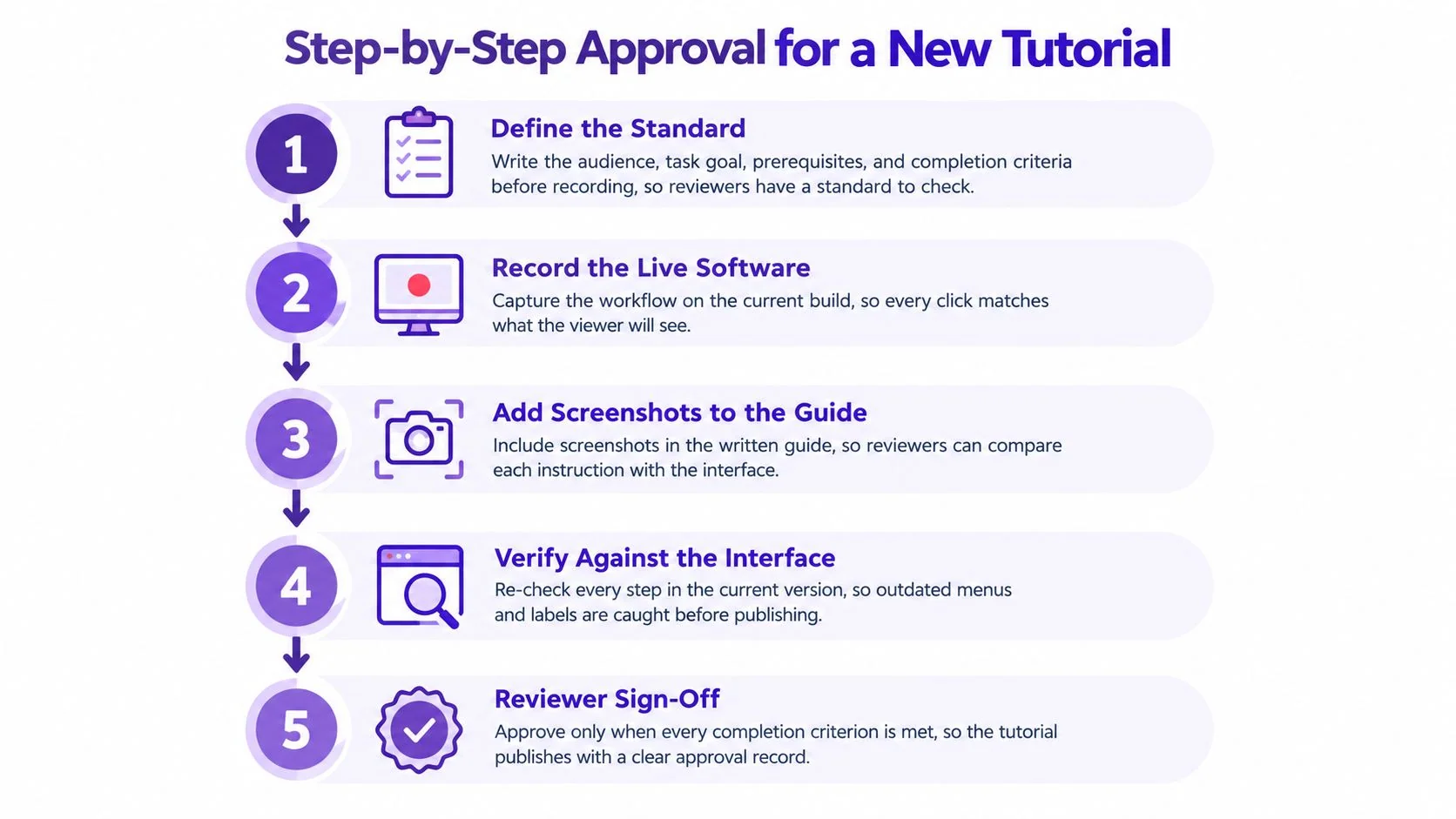
- Set the audience, task goal, prerequisites, and completion criteria before recording. The writer and subject-matter expert (SME) agree what the tutorial must help viewers do. Clear criteria prevent reviewers from debating personal preferences during playback.
- Build a traceability list. Connect each instructional claim to a product screen, test account, or source document. When a detail changes, the reviewer can check evidence instead of relying on memory.
- Ask the SME to replay every critical step on the current supported build. Record the version and any mismatch. A successful run on the author’s device alone does not verify the documented path.
- Have a writer or support reviewer check structure, screenshots, captions, speaker identification, and accessibility. This pass catches clarity and presentation problems that an SME’s functional replay may miss.
- Run a usability check with representative users. The Usability Testing Standards guidance describes evaluating effectiveness, efficiency, and satisfaction. Set the number of participants and task-success thresholds as team decisions based on the audience and risk; don’t present a chosen sample size or percentage as a universal standard.
- Classify defects as blocker, major, or minor, and hold release for blockers. Incorrect commands, impossible UI actions, and exposed data are blockers. A failed major task needs correction and retesting. A wording nit can be logged without holding release if it does not mislead users.
- Record the approver, version, evidence, unresolved risks, and explicit release decision. A chat message saying “looks good” does not show what was reviewed or which version was approved.
Teams defining how to create software tutorials should establish this gate before increasing production. Route corrections back to the relevant owner, and retain the approval record with the published version. That way, a later edit can be checked against the original decision.
Where this gate usually fails
The workflow stalls when a reviewer is unavailable, a draft is checked against an old build, or only expert users are asked to try it. Assign a backup to each review role and preserve the original review deadline when work is rerouted. Visual polish cannot verify a click path, and changes to narration, script, localization, or the interface require a check of the affected content.
Illustrative example: A short tutorial on exporting a monthly report reaches the SME after the export option has moved to a new menu. The SME returns it to draft before the usability check. Users should not be asked to follow a path the product no longer supports.
Caption, Audio and On-Screen Checks Before Release
A tutorial can pass its script review and still fail in playback. Route caption and audio checks to a reviewer who can compare the recording with the interface, then record the result against the release version.
For prerecorded audio in synchronized media, WCAG 2.1 Success Criterion 1.2.2, Captions (Prerecorded) is a Level A requirement. Captions should identify speakers and include meaningful sounds, such as an alert that affects the task. The required check is whether the captions convey the audio viewers need to follow the tutorial.
Success Criterion 1.2.5, Audio Description (Prerecorded) is Level AA when important visual information is not already conveyed by the soundtrack. A confirmation dialog that appears without narration may leave a gap. Review the video itself, since a script cannot show what viewers hear and see together.
What to listen for
Microphone and system audio create different risks. A microphone can pick up room noise, keyboard sounds, or phone calls. System audio can capture app notifications and alert tones that viewers may mistake for part of the task. Play the recording once for voice quality and once for unintended sounds. If the reviewer finds a problem, send it to the named audio or accessibility backup when the primary approver is unavailable, and keep the decision attached to the release record.
Check these points while the video plays:
- Speaker labels: At the first voice, confirm the caption identifies the speaker.
- Meaningful sounds: Check whether relevant chimes, error tones, or notifications are captioned.
- On-screen actions: Flag a dialog or other important visual that the narration does not describe.
- Label match: Confirm captions use the exact button or menu text shown on screen.
- Click timing: Check that each caption aligns with the demonstrated click.
- Small-screen readability: Reduce the player size and verify captions remain readable.
A caption that appears late can teach the wrong moment. Record any correction and recheck the published version, so approval remains traceable beyond the initial sign-off. Captioning guidance for training video
Approving Translations and Updates Without Restarting Everything
A screen or step that changes after localization forces every affected language version back through review. Approve the English master only after its screens and steps are final, then send that approved version to localization. A native-speaking technical reviewer for each locale should be able to reject examples, terminology, interface assumptions, or visuals that work in English but mislead in their market. Localization practice for tutorial video offers guidance for setting up that review.
Review the full localized tutorial, including voiceover, captions, overlays, pacing, and visual styling. Text that fits an English overlay may overflow in another language. A faster voiceover can also end before the corresponding click appears, leaving the viewer unsure which action the narration describes.
Use the split below as a starting rule, not automatic policy. Confirm it with the localization lead, and agree on the routing before recording another language. The localization best practices for software training can help teams set expectations for who reviews each type of change.
| Change | Re-Approve All Language Versions? | Local Approval Enough? |
|---|---|---|
| Product screen or button label changed | Yes | No |
| Command, setting or permission step changed | Yes | No |
| English script changes meaning | Yes | No |
| Caption timing fix that leaves steps unchanged | No | Yes, by the locale reviewer |
| Terminology correction for one market only | No | Yes, by the regional reviewer |
| Culturally specific example replaced in one language | No | Yes, by the regional reviewer and business owner |
Illustrative example: A German caption timing fix that leaves the steps unchanged can go to the German reviewer alone. A changed permission step in the English master must return to every locale for review because it changes the action viewers are asked to take.
Keep the approval record tied to the version reviewed: record the locale, change, reviewer, decision, and any required follow-up. This makes it possible to trace why one language was approved locally while a change to the master triggered review across all languages.
A new language track needs its own full review before release. It does not inherit the English master’s sign-off.
Measure the Workflow and Start Your First Review
A review queue can look busy while tutorials still reach customers with errors. Track five measures together: approval-cycle time, first-pass approval rate, blocker escape rate, task success in usability checks, and post-publication correction rate. The combination shows whether reviews are moving quickly and catching defects.
A low first-pass rate often points to gaps in the author stage, such as unclear completion criteria or steps that no one replayed. A high blocker escape rate signals that reviewers are missing defects customers later encounter. Separate support walkthroughs from sales demos when assessing task success, since combining them can conceal which tutorial type is failing.
Routing changes by risk can reduce review delays. Google researchers analyzed 251,517 design documents from 41,030 authors, including 141,652 that were fully approved, and reported a 25% reduction in median approval time across four years in their design-document approval study. The research covered design documents, not tutorials. Its relevant parallel is that several people inspect one artifact and record a decision.
Start with the tutorial customers or trainees ask about most. Set completion criteria, assign an approver and a named backup to each stage, then run one full review cycle before changing the process. Keep the record of each decision with the approved version, so the audit trail remains useful after publication.
When comparing tools, check versioning, reviewer assignment, approval history, embed behavior, caption export, and whether approved versions stay locked. Tutorial AI turns a screen recording of a real task into a tutorial video and written guide that can enter review. Confirm any approval features in current official documentation before relying on them.
Record a walkthrough of the task people keep asking about, then route the draft through the relevant owners and risk tiers before release. Tutorial AI can produce a video and written guide for reviewers to check, edit, and approve. Visit Tutorial AI to see how a recording becomes a draft for this workflow.