A support trainer has the capture window open over a live ticket queue. The lesson is a new permission toggle, and the colleague who watches later needs those clicks, not a tour of customer names, tokens, or an unreleased chart sitting on the same desktop. That is the moment when how to choose a screen recorder for confidential software training stops being a production preference and becomes a control legal and IT can defend.
Why Confidential Training Changes the Recorder Choice
The viewer of that lesson must see one thing: the approved application state and the decision being taught. The file must never hold production credentials, customer records, or live secrets. A dashboard demo that also catches a support ticket, a password manager popup, or source in an adjacent editor is no longer training. It is a durable copy of restricted information.
IBM’s 2025 Cost of a Data Breach research, covering incidents at 600 organizations between March 2024 and February 2025, put the average global breach cost at $4.44 million, down 9% from $4.88 million in 2024. The average U.S. breach cost rose 9% to a record $10.22 million, and healthcare breaches averaged $7.42 million, according to IBM’s 2025 breach-cost research. A recorder that uploads the raw capture by default can create exposure far larger than its subscription. Price is the wrong first filter.
What procurement has to require
Treat the recorder as a security control across three moments, not as a camera.
- Before capture: local or controlled recording, so raw frames do not leave the environment by default.
- During editing: encryption in transit and at rest, role-based access, single sign-on, and reliable redaction or blur.
- After publication: audit logs, retention and deletion, and restricted sharing that an administrator can revoke.
The same protection has to cover temporary files, transcripts, generated captions, thumbnails, and every export. A polished MP4 is not the only copy. Under the GDPR integrity and confidentiality principle, personal data needs technical and organizational measures against unauthorized processing and against accidental loss, destruction, or damage, as the European Commission explains for organizations applying the GDPR. Encryption or a compliance badge does not prove safety if anyone with a link can open the file, or if the raw capture sits forever.
Procurement rule: if security documentation cannot name hosting regions, subprocessors, incident-response commitments, and whether admins can revoke links and delete derived assets, the tool is not ready for confidential training.
The rest of the decision follows a sequence. Classify the lesson. Gate the tool on capture, storage, and deletion. Compare workflows by what can be proved. Score a pilot on how people record. There is no product ranking in that sequence. There is a bar the recorder has to clear.
Classify the Lesson Before You Capture Anything
Recording is not allowed until the lesson has a boundary. The boundary is the content, not the brand of the recorder.
Example. A customer-education lead needs to show support agents a new permission setting. The viewer must see the settings page, the toggle, the confirmation, and the result in the agent’s own view. The viewer must not see production customer rows, employee email, payment fields, or a real authentication token in a test environment.
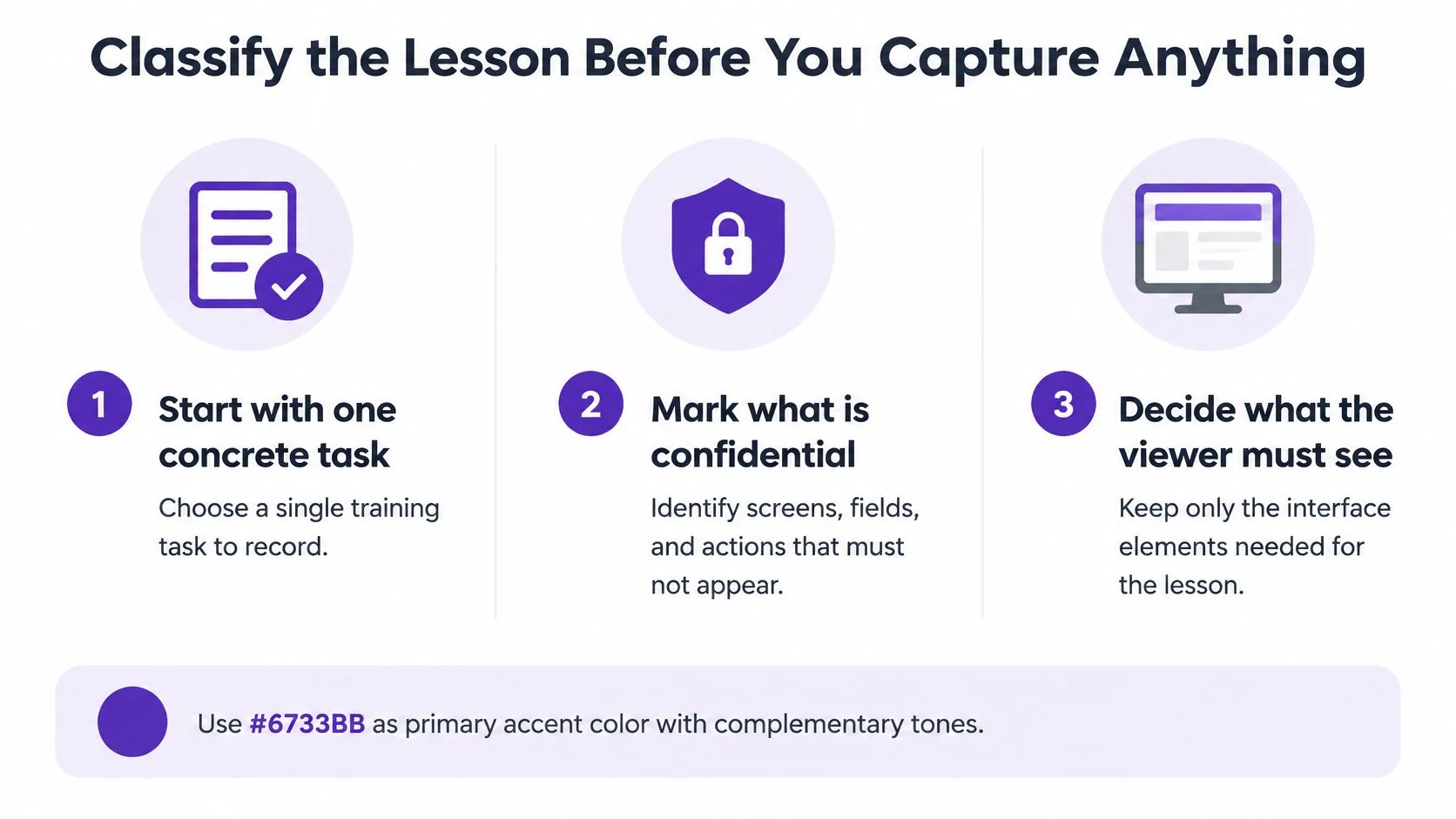
Data minimization is the legal shape of that boundary. Organizations may process only personal data that is adequate, relevant, and limited to the stated purpose, and the European Commission says they should prefer anonymous data where possible and judge how much data the purpose needs. That standard is set out in the GDPR principles for business. For a training video, the workflow has to show only the application state the lesson needs.
Capture hygiene before the red button
The CISA recommendations for video conferencing turn that principle into capture habits.
- Expose only the lesson. Close or minimize every other window. Record a chosen application or window, not the full desktop.
- Pause when unrelated data appears. A notification, a second monitor, or a dialog that was not in the script is a reason to stop, not a reason to edit later and hope.
- Fix the defaults around the file. Manage recording and file-sharing options, consider local rather than cloud storage for the circumstances, and change default filenames so a ticket ID is not the file name.
Hidden leak paths stay open even when the demonstrated product is approved for recording. Desktop notifications, browser tabs, clipboard previews, and background apps can put a secret on screen while the trainer is looking at the correct feature. Sanitized demo accounts remove most of that material before capture starts. Teams that want a fuller checklist for what must stay off camera can use this guide on how to protect sensitive information in tutorials.
If the lesson cannot be shown with a sanitized demo account and a narrow capture target, do not start recording.
A tool that captures everything by default creates a larger review and disclosure burden than one that supports a narrow target, pause, and redaction after the take. Classification decides whether a take is allowed. The next test decides whether a given recorder can hold that line.
Gate the Recorder Across Capture Storage and Deletion
Run every candidate through four gates in order. A blur slider on the export screen is not gate one.
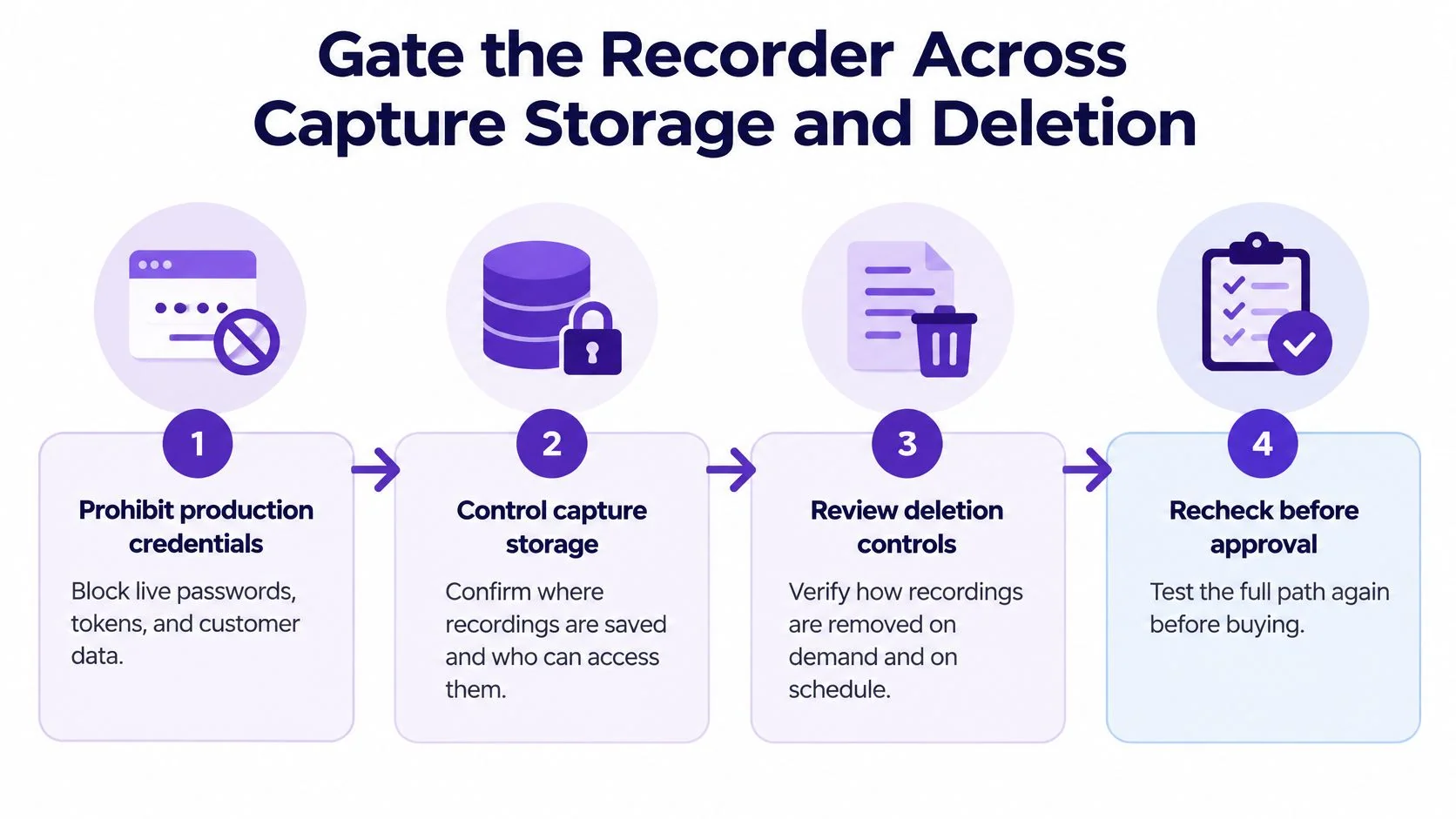
Gate 1, content prohibition. Training content may not include production credentials, customer data, or live secrets. If the only way to demonstrate the click is a live admin password, the lesson is redesigned, not recorded.
Gate 2, capture control. Confirm the recorder can pause, can limit capture to a window, and can obscure sensitive regions before publication. Application-level capture is safer than a full desktop, and it still will not stop a popup that belongs to another process.
Gate 3, storage and sharing. Inspect encryption in transit and at rest, individual authentication, role-based access, revocation, retention limits, and provider deletion. Ask who can view, download, edit, or share a recording, whether access can be withdrawn immediately, and whether deletion covers primary storage and derived assets. Article 33 of the GDPR generally requires notice to the supervisory authority without undue delay and, where feasible, within 72 hours of awareness, describing the breach, data categories, approximate numbers of people and records, likely consequences, and mitigation. The UK Information Commissioner’s Office states the same 72-hour deadline and notes that failure to report can lead to a fine of up to £8.7 million or 2% of global turnover. A recorder that cannot show who touched the file will not support that notice.
Gate 4, a controlled red-team take. Record fake credentials, browser history, notifications, clipboard contents, and an adjacent application. The point is to see what the tool keeps, not to admire the picture.
What the acceptance bar looks like
NIST guidance on privacy in virtual meetings recommends limiting screen sharing, restricting who may share, using one-time access codes or multi-factor authentication, encrypting recordings with a passphrase, and deleting provider-stored recordings when they are no longer needed. For regulated or controlled information, the same body of guidance calls for authorized-user access, cryptographic protection of remote sessions, managed access-control points, and FIPS-validated cryptography where it applies.
A practical acceptance threshold is zero exposed secrets in three consecutive test recordings and successful access revocation within one business day. Reviewing only the exported video misses thumbnails, transcripts, project files, autosave caches, browser extensions, and share links. The same habit applies outside the recorder. Before a laptop goes to a repair shop, teams should back up sensitive data before maintenance and confirm no training project remains on that disk.
Compare Workflows by What You Can Prove
A pass on the four gates is not the end of the choice. Two tools can both blur a field and still differ on whether the confidentiality lifecycle can be proved: pre-capture exposure, AI-processing boundaries, retention, deletion, auditability, and accidental disclosure.
Buying guides often stop at encryption, permissions, and a blur control. They rarely show how to test what happens before capture, what an AI service retains, or whether deletion reaches every derivative. Screen recordings become durable assets. They can hold credentials, customer data, source code, financial records, and internal documents. A polished blur can raise risk when teams treat it as proof the secret is gone. Blurred pixels can remain recoverable in some workflows, and metadata, transcripts, captions, thumbnails, and prompts can keep the same secret. That gap is discussed in this review of screen-recording security and privacy. Privacy is also a distinct generative-AI risk, including leakage, unauthorized use, and de-anonymization.
Basic capture versus a training workflow
A basic capture-and-share recorder is the right fit when no cloud processing, transcription, or translation is allowed. The proof required is local storage, a narrow capture target, and a human editor who never uploads the raw file. It will not turn the take into a written procedure. Someone still scripts, cuts, and documents by hand.
An AI tutorial workflow fits when a person who already knows the process needs a reviewed training video and a written guide, and the team can confirm data use, residency, and subprocessors. Tutorial AI is one such option, not a general video editor and not a system that already knows a company’s software. A person records a real software screen, with or without narration, on Mac, Windows, iPhone, iPad, or in Chrome. The product turns that recording into a tutorial video and a written guide with screenshots. The user reviews and edits the script, narration, steps, and visuals. Cursor emphasis, smart zooms, blurs, and shadows can focus attention and cover sensitive areas. The same recording can also produce step-by-step documentation. Plans are described as ranging from free to Enterprise. Teams comparing capture styles can start from this overview of an online screen recorder for software tutorials.
Startups that already turn calls into build notes, including meeting-to-shipping workflows for startups, still need this proof on the training side. A clean spec does not sanitize a screen recording.
What to Prove Before You Keep a Recorder
| Decision point | Basic capture and share | AI tutorial workflow | Proof required |
|---|---|---|---|
| Pre-capture exposure | Manual window choice, easy to record the whole desktop | Depends on capture target and defaults | Allowlist or window capture, pause, recording-disabled mode |
| AI processing | Usually none | Transcription, script, narration, sometimes translation | Opt-in processing, tenant isolation, no training on customer video, residency and subprocessors in writing |
| Derivatives | Mostly the video file | Video, script, steps, screenshots, captions | Same access rules on every output |
| Retention and deletion | Often a local file the user must delete | Vendor storage plus exports and caches | Documented retention and deletion of derived assets |
| Audit and sharing | Link or folder, often weak logs | Workspace roles and share links | SSO, MFA, role-based access, download controls, revocation, audit logs |
| Accidental disclosure | Trainer discipline only | Blur plus review, still human-dependent | Red-team takes, not a visual check of the final frame |
Ask whether transcription, script rewriting, voice generation, translation, and support access are opt-in, tenant-isolated, excluded from model training, and available with no cloud or with customer-controlled storage. Do not accept “the MP4 looks redacted” as that answer.
Score a Pilot on Operational Safety
Feature checklists do not show how a trainer behaves at 4 p.m. with a release note due. Put representative trainers on a pilot and score the recorder as a control surface.
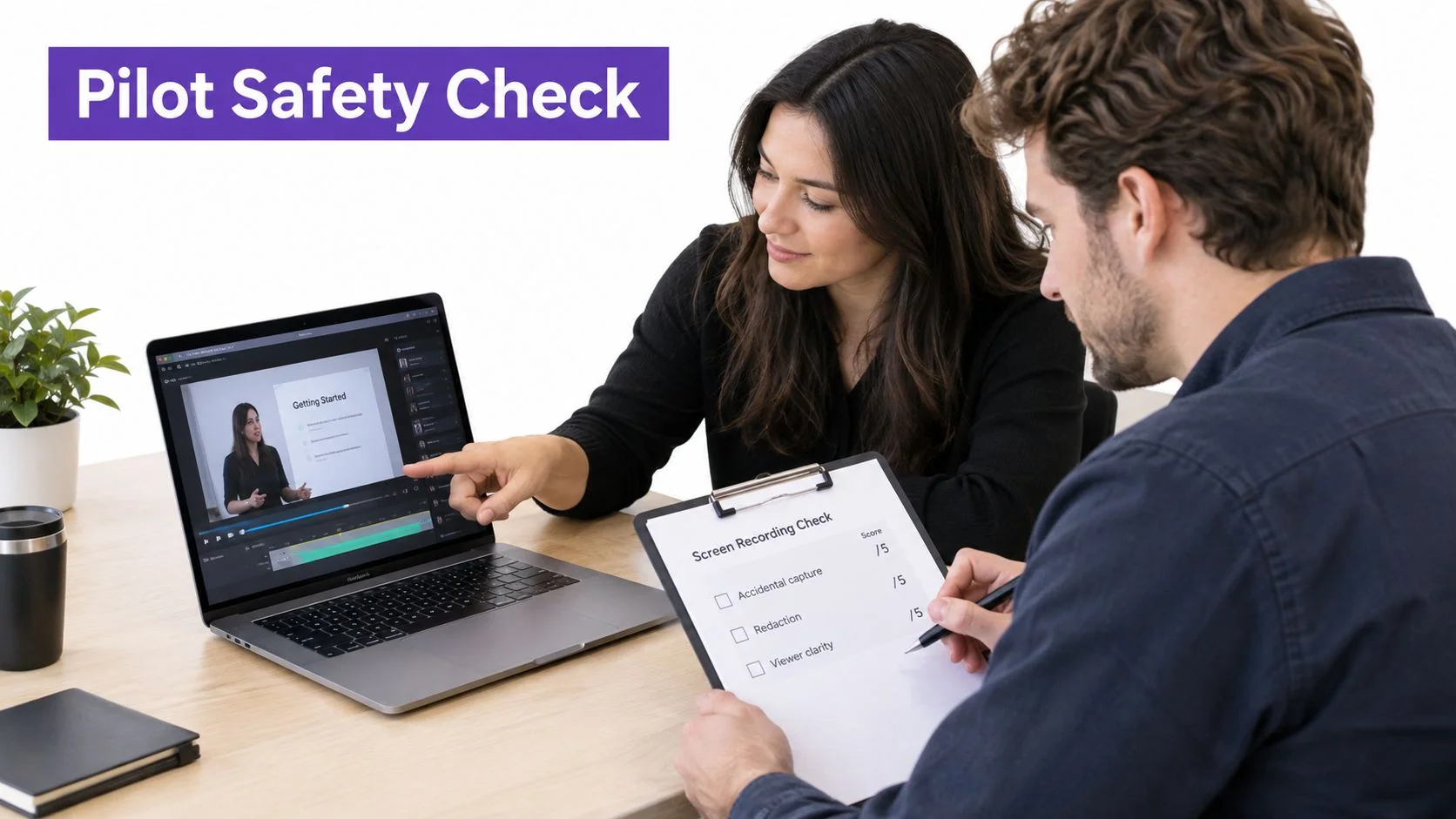
Score five things, and keep the sheet short enough that people will fill it in.
- Accidental-capture rate: how often a take includes a window, notification, or field that was out of scope.
- Redaction escape rate: how often a secret remains in any derivative after the editor thinks it is gone.
- Time to publish: minutes from approved take to a restricted link, so a slow safe path is not abandoned for a fast open one.
- Transcription accuracy on domain terms: product names, permission labels, and field names, not generic dictation scores.
- Unauthorized access share: the percentage of viewers who can open the content without authorization. The target is none.
Reviewers inspect the raw capture, the edited output, captions, the transcript, thumbnails, downloadable files, and audit logs. A clean timeline with a dirty transcript is a failed pilot.
Why defaults count as controls
Human error and IT failure are still material breach drivers. IBM’s 2025 analysis attributes 26% of breaches to human error and 23% to IT failure, in the full 2025 Cost of a Data Breach report. The recorder’s defaults and the review steps around them sit on that same control surface. NIST also advises reminding participants not to disclose sensitive information and using organization-issued devices for sensitive sessions. A personal laptop with a consumer cloud sync folder is the wrong endpoint for this pilot.
A defensible rollout gate is no critical privacy defect, documented retention and deletion, tested multi-factor authentication and revocation, and at least 95% completion of the recording checklist in pilot sessions.
Before sign-off, check the misses that show up after the demo looks fine.
- Desktop notifications that fire mid-sentence and land in the transcript.
- Production data left on screen while the trainer demonstrates a lookalike screen.
- An unrestricted link sent because the restricted one was slower to create.
- Blur that can be reversed or bypassed, including in project files and previews.
- AI transcription or voice processing whose data use, retention, residency, and subprocessors were never confirmed.
The pilot produces a score sheet. It does not produce another feature list.
If any critical item fails, the recorder goes back to the vendor conversation or off the shortlist. A partial score is not a conditional approval.
Check Every Language Then Take the Next Step
Captions, translation, and extra audio tracks are not convenience features on confidential software training. Each one is a new copy of the lesson, and each copy can leak or change meaning.
For global training, chain of custody covers the transcript, the translated script, regenerated narration, captions, screenshots, documentation, and the embedded player. Safety, medical, aviation, and financial lessons can also face jurisdiction-specific language, accessibility, and documentation duties. The overlooked test is whether security warnings, permissions, field labels, and prohibited actions keep their meaning, while sensitive strings stay masked in every output. A longer translation can shift timing, reveal a UI state that was off screen in the original, or park a caption on top of a field that had been masked. Auto-retiming can resync a scene. It does not prove semantic or privacy equivalence. Teams comparing localization methods can use these localization best practices for software training as the review checklist, not as a reason to skip inspection.
A labelled language test
Build one test lesson, label it as a test, and load it with material that breaks naive translation.
- Secrets and numbers placed in fields that must stay masked in every language export.
- Right-to-left text, accented names, and product terms that a generic model will “correct.”
- Code and prohibited actions whose wording, if softened, teaches the wrong step.
Then inspect every exported language for caption leakage, screenshot differences, and altered instructions. Captions and transcripts also need speaker identification, readable timing, keyboard-operable playback, sufficient contrast, and descriptions of meaningful visual actions. Accessibility and confidentiality fail together when a transcript spells out a token the video had blurred.
“One recording, many languages” can multiply governance work instead of cutting production cost. That is the practical reading of current training-video localization practice for regulated content. Give each locale an approval owner, a glossary, a version identifier, a retention rule, and deletion that reaches cached players, exports, documentation, and AI-generated artifacts. If deletion stops at the original project, the French caption file is still a breach path.
On a sanitized demo of a real feature, record only the task the viewer must learn, generate the tutorial video and the written guide from that recording, and review every derivative before anyone shares a link. That is the quality check. The interface in the guide has to match the interface on screen now, the secret test strings have to be absent from every language, and the share control has to match the pilot score sheet.
Tutorial AI turns a real software recording into a tutorial video and a written guide that trainers can review before anything is shared, which is the workflow confidential lessons need. Use it on a sanitized feature, confirm the data-use terms with IT, and keep every language and export inside the same retention rules. Visit Tutorial AI to try that recording-to-tutorial path.