Every growing team hits the same wall. The product changes weekly, the onboarding flow gets revised twice in a quarter, support writes workarounds in Slack, and someone remembers the help center only when launch day is already close.
That’s when documentation becomes expensive in the worst possible way. Not because writing itself is hard, but because manual documentation drifts out of sync with the current product, the current process, and the way people do the work. Engineers feel it in stale API references. Customer success feels it in outdated setup guides. Sales feels it when the demo environment no longer matches the latest release. Internal teams feel it when SOPs describe a workflow nobody follows anymore.
An automatic documentation generator changes that operating model. Instead of treating docs as a separate project, teams capture knowledge from the systems and actions that already exist: code comments, repository structure, APIs, templates, workflows, and increasingly, screen recordings with narration. The result is less hand-copying, fewer missed updates, and a better chance that what gets published still reflects reality.
The important distinction is that automation doesn’t make documentation effortless. It makes it repeatable. That’s what matters. Once a team can generate a first draft from the source of truth, writers, product managers, trainers, and support leads can spend their time on accuracy, clarity, and audience fit instead of rebuilding the same material from scratch every release.
Introduction The Problem with Manual Documentation
Manual documentation usually fails long before anyone notices it. A team publishes a solid article, a polished onboarding guide, or an internal training doc. Then the UI changes, a field name is renamed, a workflow adds an approval step, and nobody updates the docs because the work lives outside the release process.
That gap creates operational drag. New hires follow old SOPs. Support agents send links with caveats. Product marketers record feature walkthroughs that age out fast. Technical writers end up chasing SMEs for screenshots, steps, and approvals instead of improving the content itself.
Where the friction starts
The core problem isn’t that teams don’t care about documentation. It’s that manual workflows ask people to do too much context switching.
A product manager ships a feature, then has to open a separate doc tool and reconstruct the user flow. An engineer updates an endpoint, then has to remember the matching reference page. A support lead records a walkthrough, then edits video, writes a companion article, captures screenshots, and reformats everything for the knowledge base.
Practical rule: If documentation depends on someone “having time later,” it won’t stay current for long.
An automatic documentation generator addresses that by moving capture earlier in the workflow. In software, that often means generating docs from source code, structured comments, or specifications. In operations and enablement, it can mean generating step-by-step instructions from user actions or a narrated screen recording.
What changes when generation is automatic
The biggest shift is procedural. Documentation stops being a cleanup task and starts becoming an output of normal work.
That doesn’t remove editorial judgment. It changes where people spend it. Instead of spending hours recreating facts, teams review structure, fill context gaps, and tailor output for different audiences.
In practice, that’s the primary value. You don’t buy an automatic documentation generator because writing is impossible. You use one because keeping documentation current by hand doesn’t scale.
How Automatic Generators Create Documentation
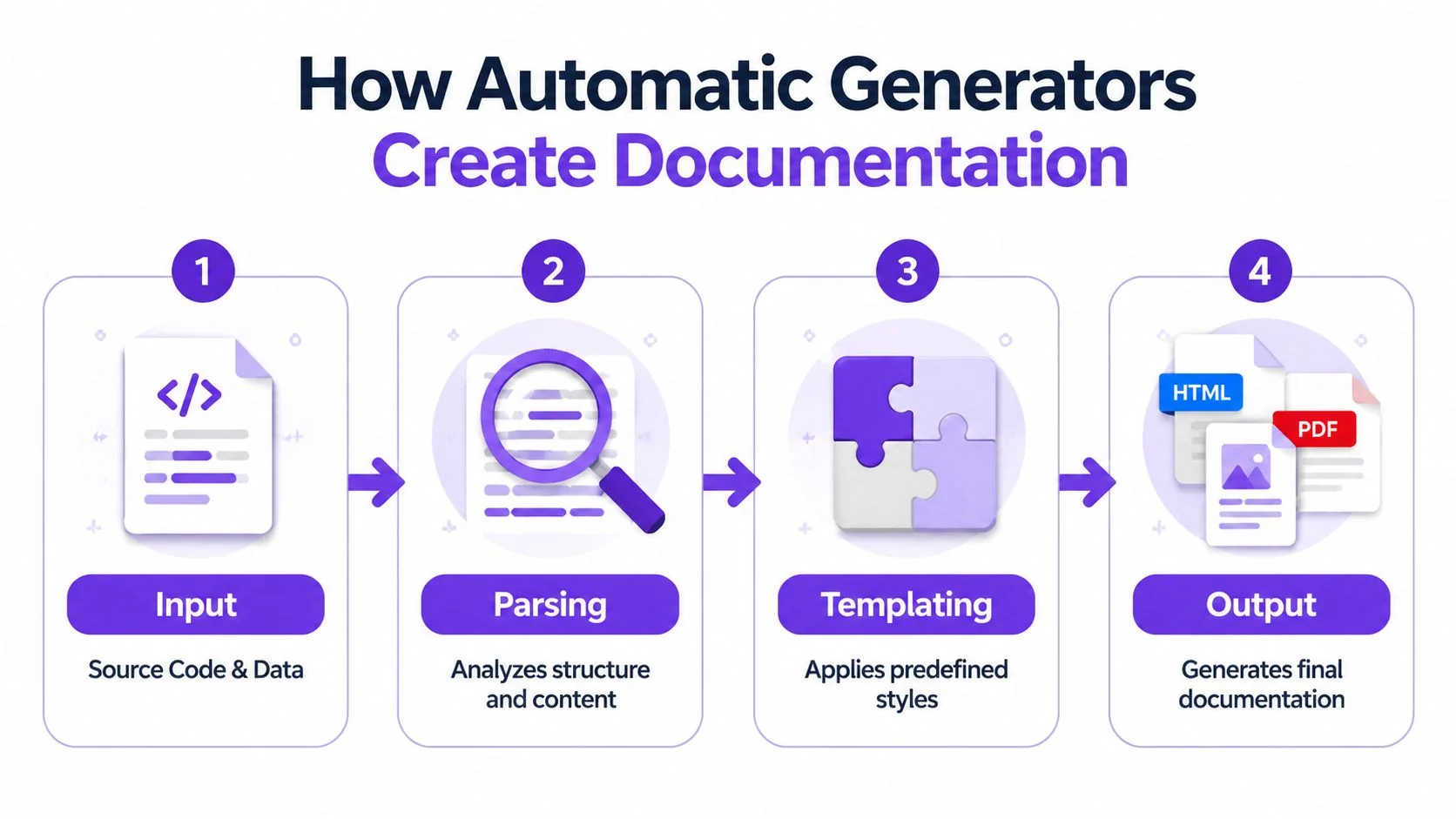
A support manager records a product walkthrough for new customers. An engineer updates an API spec. A sales engineer captures a demo flow for prospects. An automatic documentation generator can turn each of those raw inputs into publishable documentation, but only if the system can reliably move through four jobs: capture, interpret, structure, and publish.
Input
The process starts with source material. In older documentation workflows, that source is usually code, inline comments, API schemas, binary artifacts, or logs. Tools such as Javadoc and Doxygen were built for this model. They generate reference docs from the codebase itself, which works well when the audience needs technical accuracy more than narrative guidance.
The newer shift is broader and more useful for cross-functional teams. Input can also come from recorded user actions, screenshots, support transcripts, or a screen recording with narration. That matters because customer success, sales, and training teams rarely need class hierarchies. They need documentation that reflects the interface a user sees and the steps a person follows.
The hard part is choosing the right source of truth. Code is precise, but it usually lacks user intent. A recorded walkthrough captures intent, but it may miss edge cases or version details.
Parsing
After capture, the generator has to identify what the source contains and separate signal from noise.
In code-first systems, parsing usually means extracting functions, parameters, return values, object relationships, annotations, and examples. In process-capture systems, parsing looks different. The tool has to detect clicks, form entries, screen changes, captions, and spoken instructions, then decide which moments belong in the final document and which should be dropped.
This step determines whether the output is merely formatted content or something people can follow.
Parsing quality also sets the ceiling on reuse. If the system only extracts labels and syntax, the result is usually a static reference page. If it can identify user intent and sequence, the same source can become an internal SOP, a help-center article, onboarding material, or a training handout. Video-first platforms push this further by turning narration and visuals into draft articles. Teams evaluating that category often review examples through an AI tool directory entry for Synthesia to understand how video-based inputs fit into a documentation workflow.
Templating
Once the system has the parts, it has to fit them into a document model that matches the audience.
That model is where many implementations succeed or fail. A developer portal needs parameter tables, authentication notes, code samples, and changelog logic. A customer help article needs prerequisites, numbered steps, expected outcomes, and troubleshooting. A sales enablement guide may need screenshots, talking points, and a short embedded clip pulled from the original walkthrough.
Templates do more than control formatting. They decide what gets repeated, what gets summarized, and what context has to be added by a human reviewer. Bad templates produce polished clutter. Good templates reduce editing time because the structure already matches how the content will be used.
For developer-facing teams, this guide to an API documentation generator for Laravel is a useful example of how structured inputs become publishable reference content.
Output
Publishing is where documentation either gets used or disappears.
Traditional generators usually output HTML, Markdown, or PDF. Modern platforms also publish to hosted knowledge bases, embedded product help, internal wikis, LMS platforms, and article formats generated from video or workflow capture. That expansion is one of the biggest changes in this market. Automatic documentation is no longer only a developer productivity tool. It now supports onboarding, support deflection, enablement, and training.
A simple way to assess the pipeline:
| Stage | What happens | Common risk |
|---|---|---|
| Input | Collect source material | Incomplete or outdated source |
| Parsing | Extract meaning and sequence | Important context gets missed |
| Templating | Apply a document model | Output fits the wrong audience |
| Output | Publish in a usable format | Docs are accurate but hard to find |
Trust in generated documentation comes from source quality, template design, and review discipline.
That trade-off is consistent across categories. Automation removes repetitive assembly work. Teams still need editorial review to check accuracy, add context, and make sure the final document serves the people who will use it.
Comparing Generator Types from Code to Video
The term automatic documentation generator covers several very different categories. If you only think about code comments and API references, you’ll miss where the market has moved. The bigger shift is from code-centric generation toward user-centric and multimedia documentation.
Code-first generators
The original category is still useful. Javadoc and Doxygen remain the clearest examples of documentation generated from source comments and code structure. They’re strong when the audience is technical and the output is reference-heavy.
These tools work best when the questions are narrow:
- What does this method do?
- What parameters does this endpoint accept?
- Which class inherits from which interface?
- Where can a developer inspect the structure of the codebase?
They work less well for tasks like onboarding a new customer, teaching an internal process, or showing a sales engineer how to configure a workflow in a live UI. That isn’t a flaw in the tools. It’s a category boundary.
Process capture generators
A second category focuses on user actions instead of source code. These tools observe clicks, field entries, and workflow steps, then turn those actions into visual instructions with screenshots and text.
That’s useful for SOPs, onboarding docs, internal training, and help-center content because the output reflects what a user sees. It also reduces the burden on subject-matter experts who know the process but don’t want to author every instruction manually.
Still, these tools can flatten nuance. They’re good at “click here, then do this.” They’re weaker when the content needs voiceover context, narrative framing, or polished delivery for customers and prospects.
Video-to-documentation generators
The most interesting category is the one many guides skip. A single screen recording with spoken narration can now act as the source for two assets at once: a polished tutorial video and a matching written article.
Many teams no longer publish documentation in one format, as they require product demos, feature release videos, customer onboarding materials, help-center videos, support article videos, internal training, SOPs, and sales enablement walkthroughs. Producing each asset separately creates duplicate work.
A video-first generator can capture the actual interface and the presenter’s natural voice, then generate a companion article from the same source recording. That’s a different value proposition from an avatar platform. If viewers need to see the actual product UI, a synthetic talking head doesn’t solve the core communication problem.
If you want a neutral directory view of avatar tooling, Mytholyra’s AI tool directory entry for Synthesia is a useful reference point because it helps clarify what that category is built for.
Where editing workflow becomes the deciding factor
The practical comparison isn’t just about output format. It’s about what the SME has to do after recording.
Casual recorders are quick to start but usually produce footage that runs 50 to 100% longer than needed, with pauses, retakes, filler language, and dead space. That problem is consistent with broader video editing practice: editors commonly record in shorter segments and cut aggressively, as discussed in this guide on screen recording to demo video. AI-assisted screen recording tools also automate editing tasks such as captioning, noise removal, and filler word deletion, cutting production time by hours per video, according to TechSmith’s review of AI tools for screen recording.
On the other side, traditional editors like Camtasia, Adobe Premiere Pro, and Final Cut offer control, but they assume someone on the team knows how to edit on a timeline. Many product teams don’t have that person available for every release note, support article, or onboarding flow.
That’s why the video-to-doc workflow is gaining traction. A generated article plus a tightened recording is often more useful than a perfect video trapped in a backlog. This walkthrough on how to generate documentation from your video shows why that workflow maps well to modern help content.
When the same recording can feed both a tutorial video and a written article, the documentation team stops recreating the same knowledge twice.
The Business Case for Automated Documentation
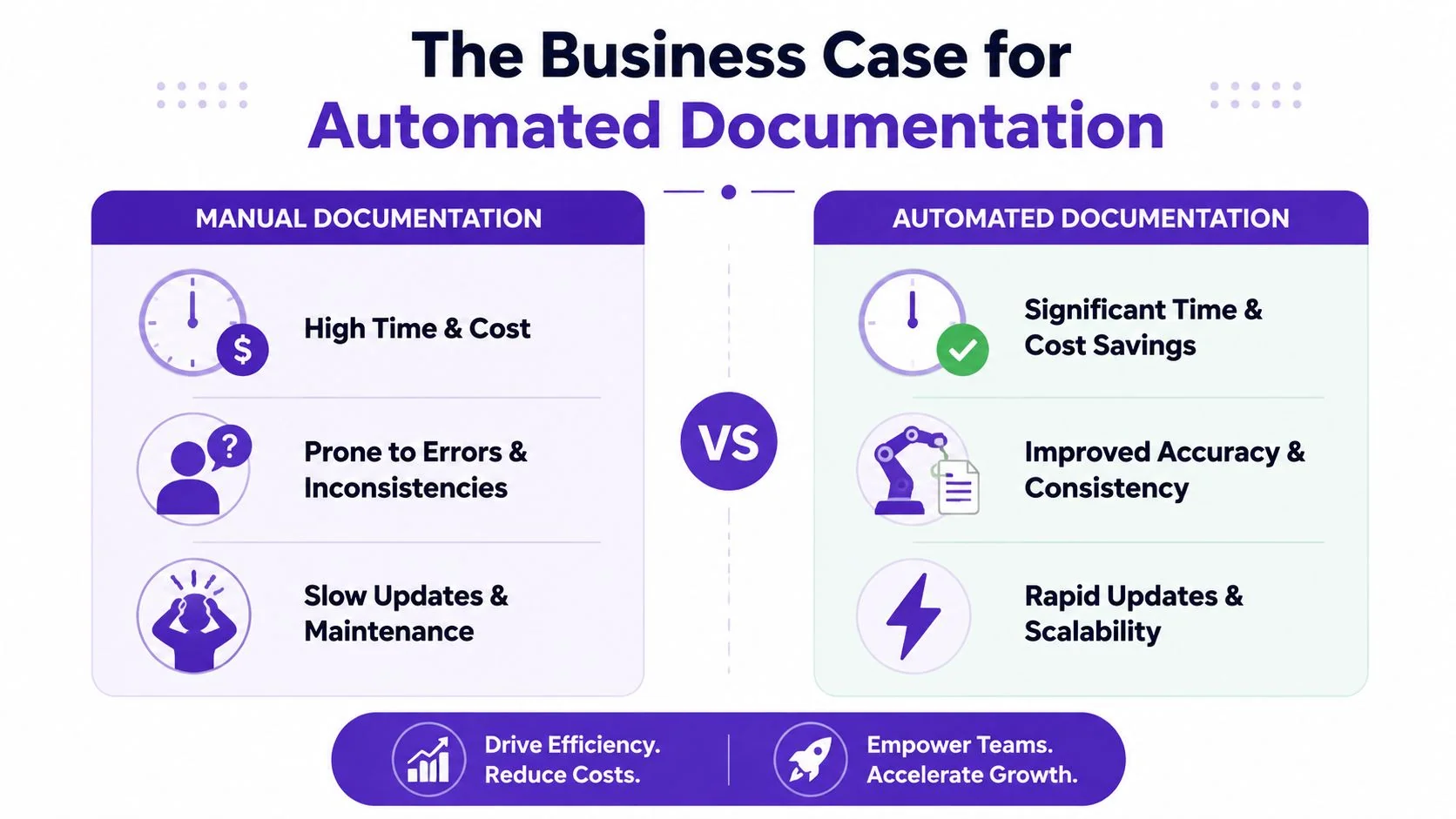
The business case becomes clear when you compare where the hours go. Manual documentation consumes time in collection, formatting, screenshot capture, revision coordination, publication, and update cycles. Automated workflows compress the repetitive parts so teams can focus on review and audience fit.
What changes in measurable terms
Benchmark data from enterprise deployments shows that AI-driven automatic documentation generators reduce time-to-publish for technical user manuals by 70% compared to manual workflows, while increasing documentation coverage from 35% to 85% within six months, according to Kodesage’s summary of deployment benchmarks.
Those numbers matter because the primary challenge for organizations is often not initial quality, but the volume and currency of documentation. They can’t keep enough documentation updated often enough across product, support, training, and customer education.
A useful demonstration of the workflow difference is below:
Where the return actually shows up
The return isn’t limited to writer productivity. It shows up across operating functions.
| Team | Manual workflow pain | Automated workflow gain |
|---|---|---|
| Support | Articles lag behind releases | Faster refresh of troubleshooting content |
| Customer success | Onboarding docs vary by rep | More consistent onboarding materials |
| Product marketing | Demo assets take too long to produce | Quicker release communication |
| Internal ops | SOPs become stale quickly | Easier process capture and updates |
The less obvious gain is that subject-matter experts spend less time reconstructing routine knowledge. They still review. They still correct. But they don’t have to manufacture every first draft manually.
What automation does not solve
This isn’t a case for publishing everything untouched. Automation can produce structure quickly, but it can also produce bland or misleading explanations when the source is messy or the intended audience is mixed.
That’s why strong teams change the workflow, not just the toolset:
- They generate first drafts from real sources.
- They define owners for review and publication.
- They keep templates aligned to audience needs.
- They treat updates as part of releases, not side work.
The business argument is strongest when automation is tied to a repeatable operating model. Without that, teams only generate documents faster. They don’t necessarily generate better ones.
How to Evaluate and Implement a Generator
A team usually notices the need for a better generator at the same moment. Engineering ships a release, support needs updated troubleshooting steps, customer success needs onboarding material, and sales asks for a demo walkthrough by Friday. If the tool only handles code comments well, every non-engineering team falls back to manual work.
Start with the source of truth
The first question is not which generator has the longest feature list. It is which source it can turn into reliable documentation with the least cleanup.
Older generators were built for code-first workflows. That model still works for API references, SDK docs, and internal developer portals. It breaks down fast when the primary source of truth is a product walkthrough, a recorded training session, or a support rep demonstrating a fix on screen. Teams that publish customer-facing content should test whether the system can handle those richer inputs instead of forcing everything back into engineering-friendly formats.
Ask these questions early:
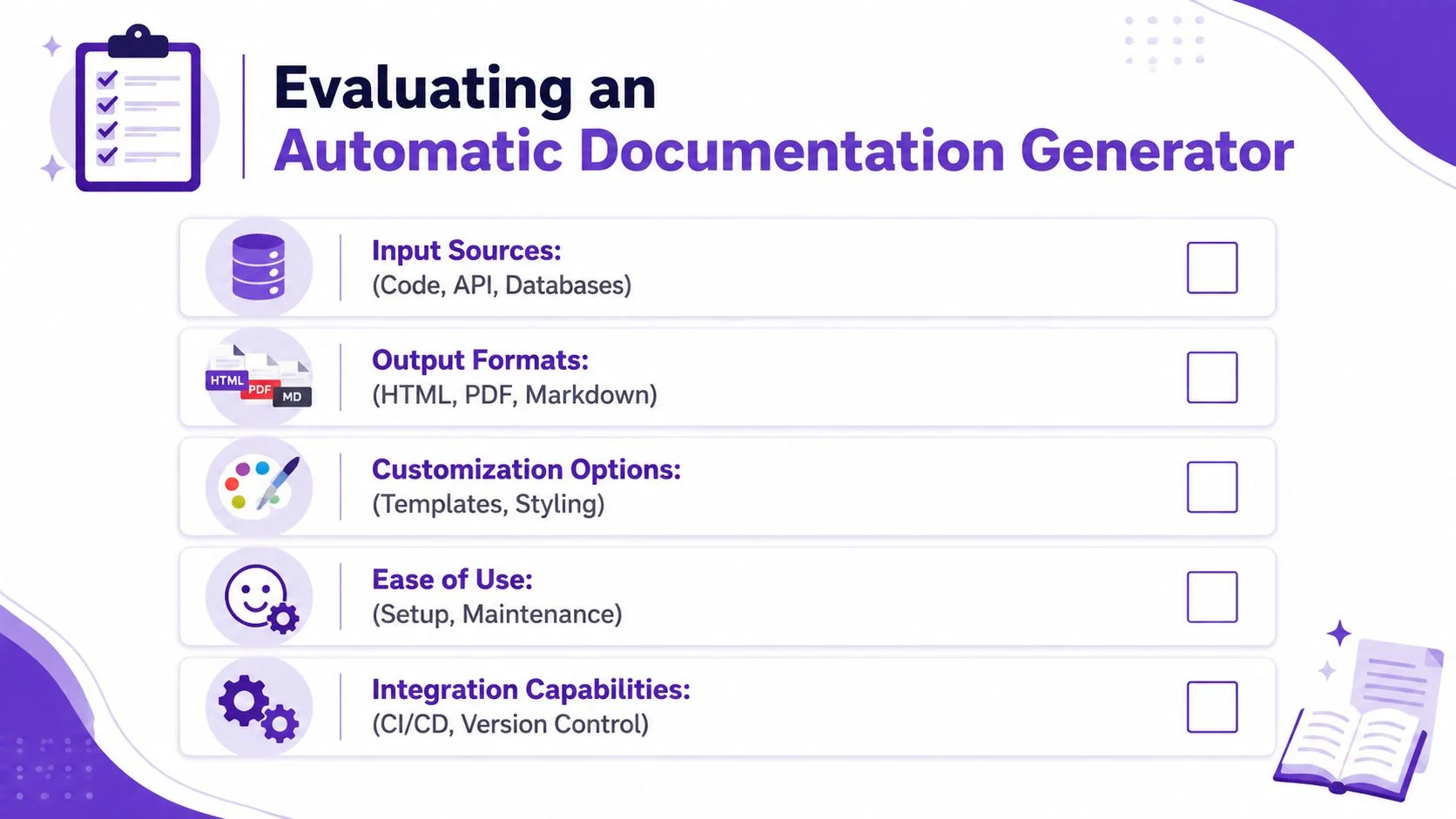
- What can it ingest? Code, APIs, product specs, screenshots, screen recordings, narrated demos, or process recordings.
- What can it publish? Markdown, HTML, PDF, hosted articles, embedded video, or help center content.
- How much editing remains after generation? A tool that creates fast first drafts is useful. A tool that produces drafts your team has to rewrite from scratch is just shifting labor.
Evaluate for the full documentation chain
A generator rarely serves only the docs team. Support needs short, searchable answers. Customer success needs repeatable onboarding flows. Sales wants polished walkthroughs. Training teams need assets they can reuse in LMS or internal enablement systems.
That changes the buying criteria. Good output is only part of the decision. Distribution, governance, and reuse matter just as much.
Look closely at these areas:
- Template control: Teams need consistent structure, tone, and visual formatting across product docs, help articles, and training material.
- Localization support: If one walkthrough has to serve multiple regions, translation and multilingual narration save a lot of duplicate production work.
- Security review: Check SSO or SAML support, access controls, auditability, and data handling before procurement is finished.
- Publishing workflow: Confirm the content can be embedded or synced into your CMS, LMS, CRM, or support hub without manual reposting.
This is also the point where knowledge management and documentation start to overlap. A practical reference is this guide on building a knowledge base that teams can actually maintain, because implementation usually fails at distribution and ownership, not draft generation.
Run a pilot around a recurring workflow
Start with a use case that changes often and already causes friction. Onboarding guides, internal SOPs, release explainers, and support walkthroughs are usually better pilots than highly regulated policy content.
I have seen teams make the wrong call here. They choose a showcase project that matters politically but updates once a quarter. The pilot looks polished, then tells you very little about whether the generator will reduce weekly documentation work. A better test is repetitive content with clear reviewers and visible consumers.
A useful pilot setup includes:
- One source type. For example, screen-recorded product walkthroughs or API specs.
- One audience. Support agents, new customers, or internal operations staff.
- One review owner. Someone accountable for accuracy and publication.
- One success measure. Time to publish, revision effort, or update speed after a product change.
Implement around handoffs, not features
The tool should fit the way knowledge moves through the company. That means mapping who captures the source material, who reviews it, who approves it, and where it is published.
This matters more now that generators can create user-facing content from video and narration, not just code and comments. The implementation problem is no longer limited to engineering documentation. It touches customer education, support deflection, training, and pre-sales enablement. If those teams are not included in the rollout, the company ends up with another isolated authoring tool instead of a shared documentation system.
If your documentation program also supports service operations, Mava’s article on how to streamline community support with AI is a useful companion read. It shows how better structured knowledge affects support delivery after the content is published.
Best Practices and The Future of Documentation
The teams that get the most from automation usually follow one rule consistently. They treat generated documentation as a draft with momentum, not a final artifact with authority.
That distinction matters more as generators become more capable. Modern systems can create structure, infer likely explanations, and produce polished output across text and media. They’re often strong at organization. They’re less reliable when business rules are subtle, exceptions matter, or compliance language must be exact.
Keep a human review loop
A 2024 arXiv study on LLM-based documentation found that without a mandatory human review loop, AI can “confidently misread hyper-specific business rules”, creating non-compliant artifacts in sectors like healthcare or finance, as discussed in Tembo’s analysis of AI code documentation generator risks.
That finding matches what many practitioners see in real implementations. Generated docs can look plausible while being wrong in the one place that matters.
A workable review model looks like this:
- Generate from the strongest available source. Prefer code, validated workflows, or narrated demonstrations over vague prompts.
- Assign a domain reviewer. The reviewer should own the underlying process or product behavior.
- Review for intent, not grammar only. Most generators already produce readable prose. The primary risk is logical misinterpretation.
- Publish with version ownership. Someone should be accountable for future refreshes, not just initial approval.
Treat AI-generated docs like AI-generated code. Draft automatically, review before merge.
Watch for failure modes that creep in slowly
The hardest documentation problems aren’t always obvious on day one. They accumulate in maintenance.
Common failure modes include:
- Style drift: Different generators or contributors produce inconsistent tone and structure.
- Stale screenshots or UI references: Text may update while visual evidence stays old.
- Template mismatch: A template built for developers gets reused for end users and confuses both.
- Overproduction: Teams generate too many low-value pages because creation becomes easy.
The fix isn’t more automation. It’s tighter editorial policy. Define what gets generated, who approves it, and when outdated content gets retired.
Where documentation is headed
The future of documentation is less about one perfect format and more about one captured source producing multiple usable outputs. Code can feed reference docs. A real product walkthrough can feed a tutorial video, a step-by-step article, and localized variants. Teams can publish the same knowledge in forms that match how customers, support agents, sellers, and new hires learn.
That’s the part many older guides miss. Documentation is no longer only a developer artifact. It’s becoming a shared operational asset across customer success, sales enablement, training, and support.
For a complementary perspective on this broader shift, Halo AI’s piece on Automating product documentation with AI is useful because it looks at documentation as part of product support operations, not just a writing task.
The winning teams won’t be the ones that generate the most pages. They’ll be the ones that build a reliable system for turning product truth into usable, reviewed, multi-format knowledge.
If your team wants one workflow for polished tutorial videos and matching written articles, Tutorial AI is built for that job. Record the screen with spoken narration, tighten pacing with AutoRetime, generate documentation from the same recording, localize in 74 languages, and publish on-brand content with enterprise features such as Brand Kits, SSO/SAML, SOC 2, and GDPR support. It’s a practical fit for product demos, onboarding, help-center content, internal training, SOPs, and sales enablement walkthroughs.