
How do I share a single language version of a video independently?
Share one language as its own standalone link or embed — without the multilingual player's language switcher.
When you publish a translated video, the Multilingual Player bundles every published language into one embed and shows viewers a language selector inside the player. Sometimes you want the opposite — distribute a specific language only, with no language switcher and no other languages visible to the viewer.
To do this, duplicate the translation and publish the copy independently. The duplicate is a standalone project (not part of the multilingual set), so when you embed or share it, viewers see only that one language.
When would you use this?
- Targeted distribution to a single audience where exposing other languages would be confusing or off-brand (e.g. a French marketing page where you don’t want viewers seeing English in the selector).
- Campaign-specific landing pages that should only carry one language.
- Internal sharing of an unreleased translation without exposing in-progress translations to external audiences.
- A/B testing where each variant must be a single language with no escape hatch.
How to do it
Step 1 — Open the Translation Folder
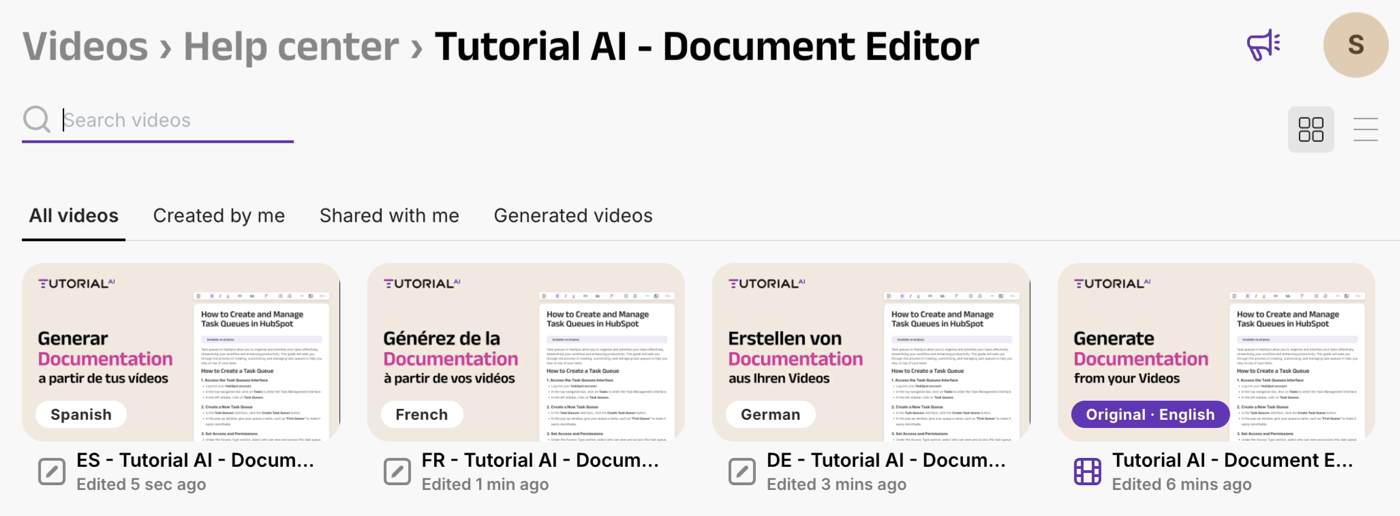
Find the source video on your Videos dashboard. Open its Translation Folder to see every translated language version.
Step 2 — Duplicate the language version you want to share
Open the translation you want to share independently. From the project menu, choose Duplicate.
The duplicate becomes its own standalone project, separate from the Translation Folder. It’s no longer part of the multilingual set.
Step 3 — Generate and publish the duplicate
Open the duplicated project. Open the Share menu, click Generate to render the video, wait for generation to complete, then Publish.
Step 4 — Share or embed the standalone version
Use the share link or embed code from the duplicated project. The Multilingual Player won’t appear — viewers see only this language. No selector, no other languages.
⚠️ The duplicate is independent. Once you duplicate, the copy isn’t linked back to the source. Updates to the original video or to the other translations in the Translation Folder won’t propagate to the duplicate — you’d need to re-duplicate to pick up changes. Use this approach when you specifically want the duplicate frozen, or when the language version is finalized and won’t need maintenance updates.
Alternative: keep the multilingual player, pin a default language
If you’re OK with viewers seeing the language selector but want the video to open in a specific language by default, you don’t need to duplicate. Just append ?lang=<code> to your share or embed URL:
https://embed.videoscripter.ai/video/{video_id}?lang=deThe player opens in German. Viewers can still switch languages from the in-player selector. Updates to the source video and translations propagate automatically — no re-duplication needed.
For the full ?lang= reference (accepted codes, fallback behavior), see the Video Player documentation.
When to use which
| Need | Approach |
|---|---|
| Open in a specific language by default, but let viewers switch | ?lang= URL parameter on the share/embed URL |
| Single language only — no switcher, no other languages visible | Duplicate the translation and publish independently |
| Need updates to the source to propagate automatically | ?lang= (keep the link live) |
| Need the language version frozen (won’t auto-update with source changes) | Duplicate |
Tips
- Name the duplicate clearly. Once it leaves the Translation Folder, the duplicate is just another project in your library — renaming it
"Tutorial AI — German (standalone)"(or whatever your naming convention is) saves confusion later. - Track which translations have standalone duplicates. If you maintain campaign-specific landing pages backed by duplicated standalone versions, keep a list. Source updates won’t propagate, so each duplicate needs its own refresh schedule.
- Move duplicates into a folder. Standalone language versions are easier to manage if you group them in a folder like
"Standalone Translations"so they don’t clutter your main library.